
TapePrint: order flow on your chart
A footprint indicator that shows how many contracts traded at the bid and at the ask on every price level of every bar. Lite is free: cells, volume profile and imbalances. Pro adds absorption, derived areas, whale markers, a pullback bar, a statistics grid and functions for your strategies.
Lite is free. Pro: $99.00 one-time, lifetime licence for one PC.
Watch the demo (2:30)
TapePrint Pro on a live MNQ chart with a 60-range bar: the bid x ask footprint, imbalances and stacked imbalances, delta and volume above each bar, and the Pro absorption boxes, support and resistance areas and delta grid. A chart capture with captions, not a trade example.
Markers describe order flow; they are not buy or sell recommendations. Not financial advice. Pressing play loads the video from YouTube (privacy-enhanced mode); see the privacy policy. Watch on YouTube instead.
What it looks like
Real charts from NinjaTrader 8 on MNQ with a 60-range bar, using Market Replay data. Chart captures, not trade examples.
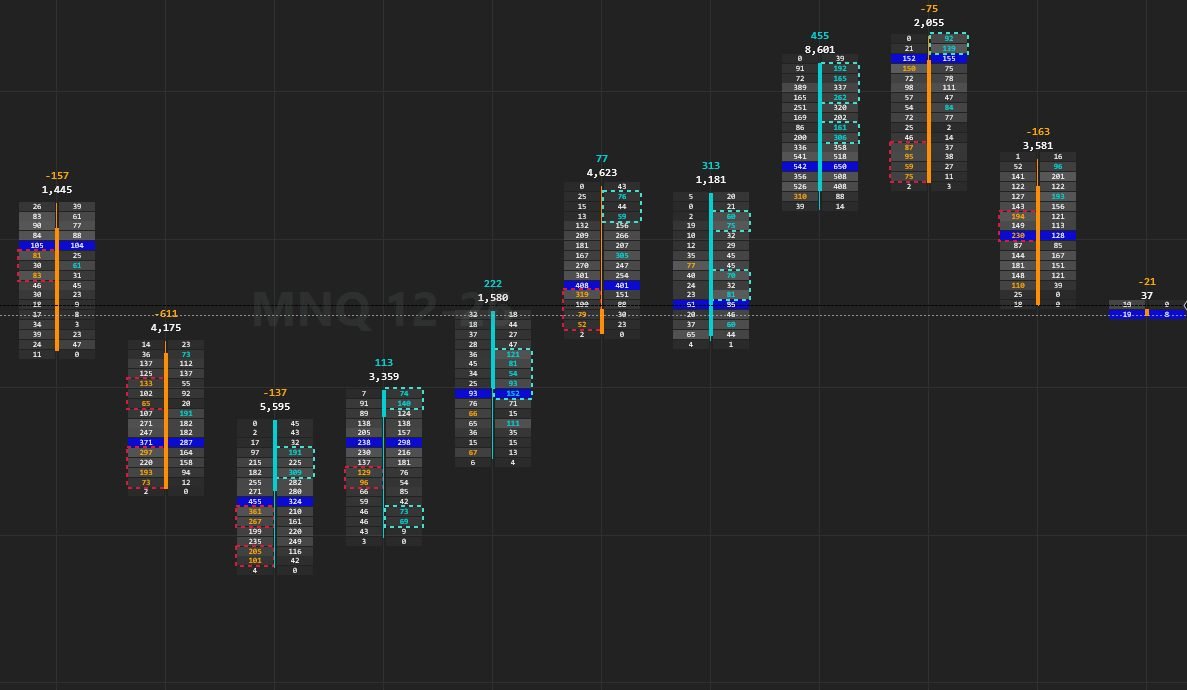
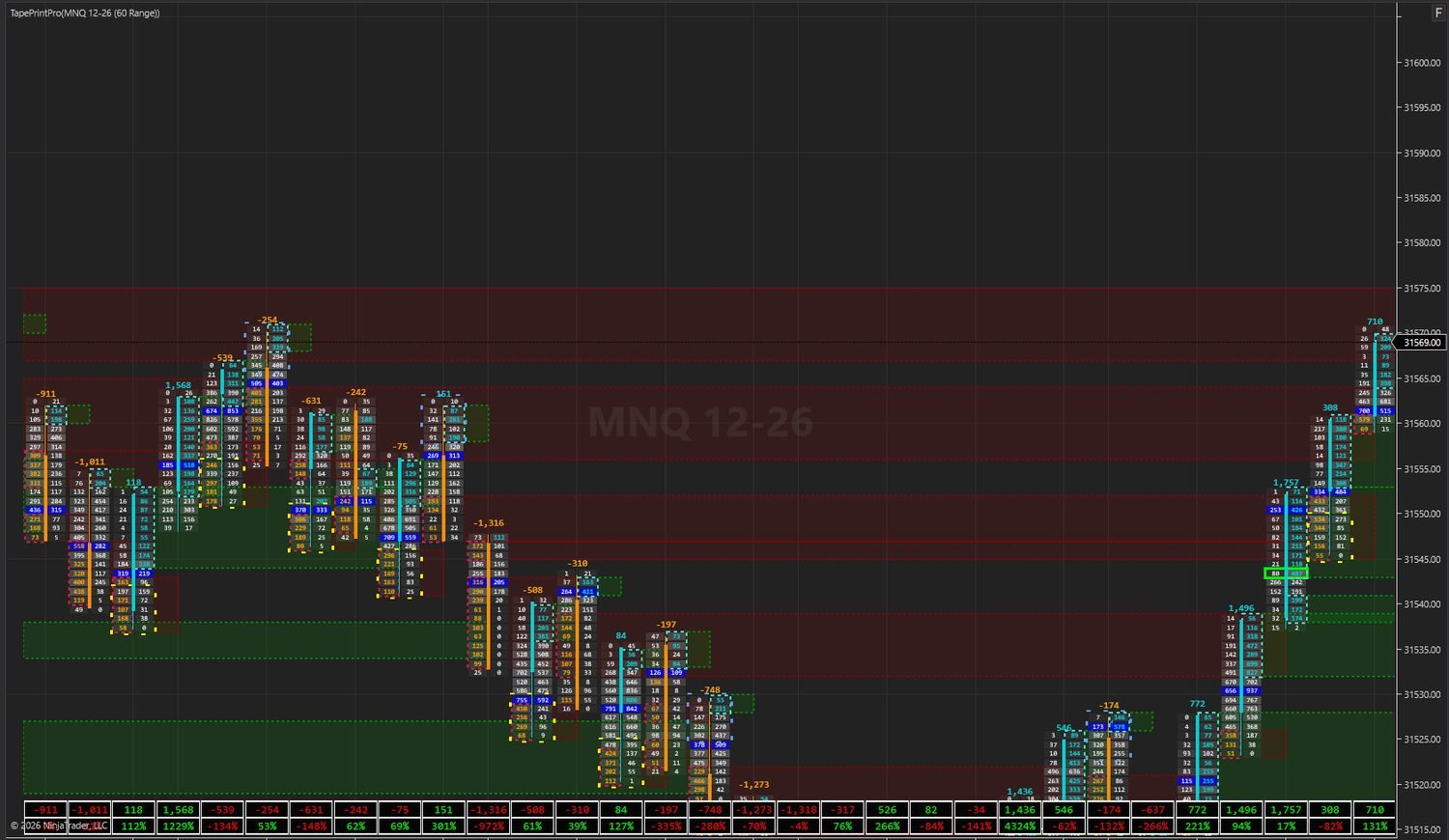
Markers describe order flow. They are not buy or sell recommendations, and nothing here shows that any setting makes money.
Lite and Pro
Pro contains everything in Lite. Without a licence key, Pro runs with the Lite features only.
| Lite Free | Pro Licence key | |
|---|---|---|
| Cells as bid x ask, delta or volume, with gradient shading | ✓ | ✓ |
| Per-bar statistics: volume, delta, delta %, min / max delta, optional session cumulative delta | ✓ | ✓ |
| History Bars limit: keep the footprint of only the latest N bars while history loads (default 30) | ✓ | ✓ |
| Auto Bar Spacing: widens the chart bar distance after loading if the footprint would not fit | ✓ | ✓ |
| Volume profile with point of control and value area | ✓ | ✓ |
| Imbalances, diagonal or horizontal, by multiplier or percentage | ✓ | ✓ |
| Stacked imbalances (number in a row, optional one-level gap) | ✓ | ✓ |
| Auto-fit to bar spacing and full colour settings | ✓ | ✓ |
| Absorption at the bar's extremes | – | ✓ |
| Unfinished auctions | – | ✓ |
| Derived support / resistance areas from stacks and absorption | – | ✓ |
| Whale markers (WB / WS) | – | ✓ |
| Pullback bar beside the forming bar | – | ✓ |
| Statistics grid: delta and delta % change along the bottom | – | ✓ |
| Read-only functions for your own NinjaScript strategies Rows, stacks and whale data of each bar | – | ✓ |
How the footprint is built
Each trade is classified as a buy (at or above the ask) or a sell (at or below the bid, with the tick rule in between) and added to its bar at its price level. You choose the thresholds: imbalance ratio, high / low side volumes, stack size, and in Pro the absorption ratio and depth, whale size, and which areas to keep.
- Works on tick, range, time and Renko-style bars
- Ticks-per-level and a minimum trade size filter, for NQ / MNQ and other instruments
- Auto-fit hides numbers and labels when bars are close together, so the chart stays readable
How the Pro licence works
- Add the free TapePrint Lite to a chart. It shows a small Get TapePrint Pro button and your Machine ID, an anonymous code derived from your PC that is only sent to us if you click the button.
- Buy Pro. The button opens the purchase page with your Machine ID filled in. After you pay, the page shows your key and a download link for TapePrint Pro.
- Import Pro, paste the key in Properties → Licence, and the Pro features switch on. You paste it once per PC: Pro remembers the key and uses it on every chart you add it to afterwards.
The key is checked on your PC and the indicator does not connect to the internet to do it. One key works on one PC. Moving to a new PC? Email us.
Requirements
| Platform | NinjaTrader 8 (desktop), Windows. Tested on NinjaTrader 8.1.9. |
|---|---|
| Market data | A data feed with bid / ask tick data. Footprint history needs Tick Replay enabled (Tools → Options → Market Data → Show Tick Replay, then Tick Replay on the chart's data series). More on the data a footprint needs, and the free options: NinjaTrader 8 footprint chart: what you need and what's free. Step by step: footprint without Order Flow+: setup guide. |
| Setup tip | Auto Bar Spacing widens the chart's bar distance for you after the history loads, and you can also widen it yourself (for example 120 or more). For MNQ / NQ, 2–4 ticks per level is a common starting point. |
| Install | Do not unzip the download. In NinjaTrader choose Tools → Import → NinjaScript Add-On and select the zip, then add TapePrintLite or TapePrintPro to a chart. |
| Upgrading from v1.0 | Close any chart that uses TapePrint, import the new zip the same way and restart NinjaTrader. We have tested a clean install of v1.1, not an upgrade over v1.0: if NinjaTrader reports that a TapePrint type is already defined, use Tools → Remove NinjaScript Assembly to remove the old TapePrint entry, then import again. New in v1.1: History Bars (under Filters) defaults to 30, so a chart keeps the footprint, and in Pro the derived zones, of only the latest 30 bars while the history loads. Set it to 0 to keep everything, as v1.0 did. |
| Delivery | Compiled build. We do not distribute source code. |
File: TapePrintLite_v1.1.zip (190 KB). SHA-256: d15990755babb2d36cc1eff3f953715bf967a4044dc4d792ddbd6ad3745404d5
What it is not
- Not a signal service. Markers describe order flow; they are not recommendations to buy or sell.
- Not a strategy and it places no orders.
- Not a promise of results. Reading order flow takes practice, and traders lose money using any tool.
- Not affiliated with NinjaTrader or your data provider.
Questions
What is the difference between Lite and Pro?
Lite is a complete footprint: cells, statistics, volume profile and imbalances, free to use with no key. Pro adds absorption, unfinished auctions, derived areas, whale markers, the pullback bar, the statistics grid and functions for your own strategies. See the table above.
Does it work on historical data?
Only with Tick Replay enabled. Without it, the footprint builds from the moment you load the chart.
Why does it take a while to load?
The footprint is built from every tick, so a long Tick Replay history takes time to rebuild, and it rebuilds when you change a setting. Two settings help: History Bars (default 30) keeps the footprint of only the latest bars while the history loads, and loading fewer days on the chart's data series means fewer ticks to replay. NinjaTrader still replays every tick of the days you load, so those days are the main cost. In our test on an MNQ 500-tick chart, 9.5 million ticks of Tick Replay history loaded in about 25 seconds; your computer and data feed will differ.
What happens if my key is missing or wrong?
Pro keeps running with the Lite features and shows a message on the chart. Your settings are kept, and the Pro features come back when a valid key is entered.
Does it place trades?
No. It is an indicator that draws on the chart.
Will it work with my prop firm?
It is a chart indicator, so it does not trade. Check that your firm and its platform setup allow the indicators and data you plan to use.
How do I get Pro, and what does it cost?
Pro is $99.00 one-time, a lifetime licence for one PC, paid through PayPal. You enter your Machine ID, pay, and the key appears on the page straight away. Pro is sold to customers in the United States only for now. To try it first, download the free Lite edition and add it to a chart: its Get TapePrint Pro button opens the purchase page with your Machine ID filled in. See the terms and the refund policy.
Risk. Educational and entertainment content and software only; nothing here is financial advice. Futures trading carries a substantial risk of loss and is not suitable for everyone. Hypothetical or simulated results have inherent limitations and do not represent actual trading. Past performance does not predict future results. Vortex Futures Trade Lab is not a prop firm, does not sell funded accounts, and is not affiliated with NinjaTrader. Follow your own prop firm's rules; nothing here is advice on how to meet or avoid them.